
GR00T Reference Workflow for Unitree G1#
This tutorial walks through the full GR00T Reference Workflow on the Unitree G1: turning human teleoperation demonstrations into a deployed humanoid policy. You will record demonstrations to fine-tune the GR00T N foundation model, then deploy it on the robot to perform the task autonomously.
The example task is apple-to-plate — the robot stands at a table, picks up an apple, and places it on a plate.
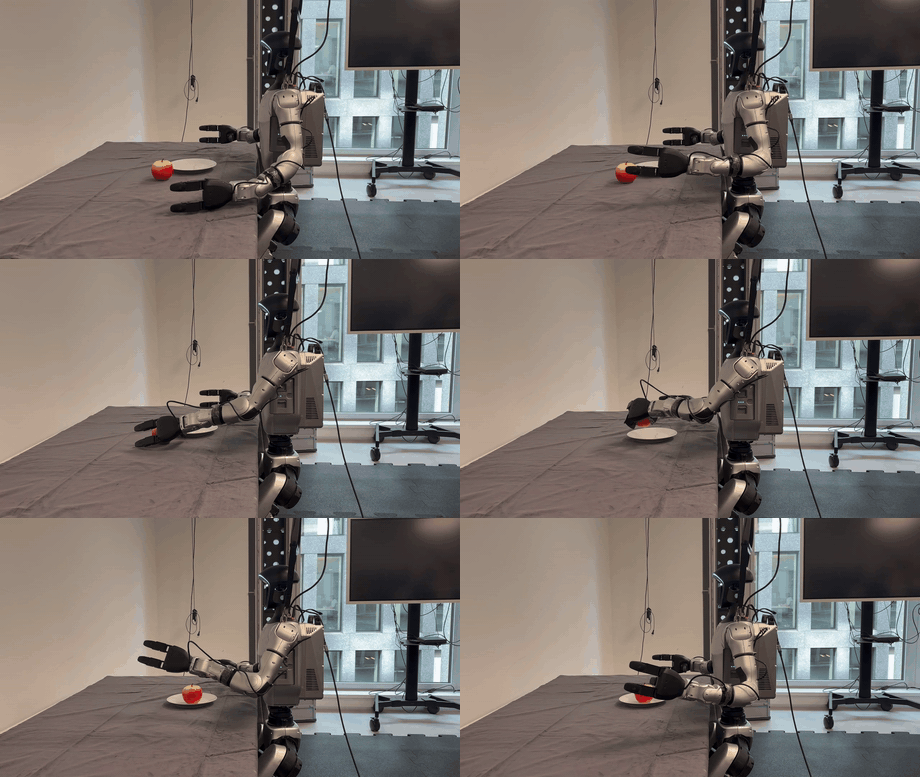
The three high-level steps are:
Collect data via teleoperation.
Train a fine-tuned GR00T N policy on the collected data and export it via LEAPP.
Deploy the policy on a Unitree G1.
If you do not want to collect your own demonstrations, a pre-trained GR00T N policy already fine-tuned to this task is provided.
Requirements#
To follow this workflow you will need:
Unitree G1 humanoid with Dex3-1 hands and an attached Intel RealSense camera
Jetson AGX Thor or an x86_64 system with an NVIDIA GPU
To collect your own demonstrations, you will also need:
A PICO 4 Ultra or Meta Quest 3 XR headset
An L-40 or better NVIDIA GPU
Two people for the teleoperation — one to operate the robot, one to monitor the recording
For the apple-to-plate task:
A light red apple
A white plate roughly 19 cm in diameter
A table with a black surface (height ≈ 75 cm). If using a tablecloth, affix it firmly to the table.
Note
For Jetson AGX Thor workflows, you can use either an external Jetson AGX Thor connected to the robot or the official Unitree Thor backpack mounted on the robot.
Setup#
Complete the following one-time setup before starting any sub-tutorial.
Compute Hardware#
If you plan to deploy on a real Unitree G1 with Jetson AGX Thor,
complete the host-level setup before starting the Isaac ROS environment
with isaac-ros activate. See
Real-Hardware Prerequisite Details.
Development Environment#
Set up your development environment by following the instructions in getting started.
(Optional) Install dependencies for any sensors you want to use by following the sensor-specific guides.
Note
We strongly recommend installing all sensor dependencies before starting any quickstarts. Some sensor dependencies require restarting the development environment during installation, which will interrupt the quickstart process.
The recommended Docker config.yaml for this Workflow is the following:
docker:
  image:
    additional_image_keys:
      - realsense
      - gr00t_workflow
Camera#
Set up the Intel RealSense camera by following the RealSense setup tutorial.
Workflow#
Each sub-tutorial assumes the Isaac ROS environment is active
(isaac-ros activate) and the workspace is sourced
(source install/setup.bash). Follow the six sub-tutorials below in
order.
# |
Step |
Tutorial |
Package reference |
Supported Compute Platform |
|---|---|---|---|---|
1 |
Teleoperate the robot |
Jetson AGX Thor |
||
2 |
Record demonstrations |
Jetson AGX Thor |
||
3 |
Convert MCAP → LeRobot |
x86_64 or Jetson AGX Thor |
||
4 |
Fine-tune GR00T N (external) |
gr00t-leapp-export (external) |
x86_64 |
|
5 |
Export via LEAPP (external) |
gr00t-leapp-export (external) |
x86_64 |
|
6 |
Deploy the fine-tuned policy |
Jetson AGX Thor |