

isaac_ros_graspgenx #
Source code available on GitHub.
Quickstart#
Set Up Development Environment#
Set up your development environment by following the instructions in getting started.
(Optional) Install dependencies for any sensors you want to use by following the sensor-specific guides.
Note
We strongly recommend installing all sensor dependencies before starting any quickstarts. Some sensor dependencies require restarting the development environment during installation, which will interrupt the quickstart process.
Download Quickstart Assets#
Download the sample rosbags from NGC:
Make sure required libraries are installed.
sudo apt-get install -y curl jq tar
Then, run these commands to download the asset from NGC:
NGC_ORG="nvidia"
NGC_TEAM="isaac"
PACKAGE_NAME="isaac_ros_grasping"
NGC_RESOURCE="isaac_ros_grasping_assets"
NGC_FILENAME="quickstart.tar.gz"
MAJOR_VERSION=5
MINOR_VERSION=1
VERSION_REQ_URL="https://api.ngc.nvidia.com/v2/resources/$NGC_ORG/$NGC_TEAM/$NGC_RESOURCE/versions"
AVAILABLE_VERSIONS=$(curl -s \
    -H "Accept: application/json" "$VERSION_REQ_URL")
LATEST_VERSION_ID=$(echo $AVAILABLE_VERSIONS | jq -r "
    .recipeVersions[]
    | .versionId as \$v
    | \$v | select(test(\"^\\\\d+\\\\.\\\\d+\\\\.\\\\d+$\"))
    | split(\".\") | {major: .[0]|tonumber, minor: .[1]|tonumber, patch: .[2]|tonumber}
    | select(.major == $MAJOR_VERSION and .minor <= $MINOR_VERSION)
    | \$v
    " | sort -V | tail -n 1
)
if [ -z "$LATEST_VERSION_ID" ]; then
    echo "No corresponding version found for Isaac ROS $MAJOR_VERSION.$MINOR_VERSION"
    echo "Found versions:"
    echo $AVAILABLE_VERSIONS | jq -r '.recipeVersions[].versionId'
else
    mkdir -p ${ISAAC_ROS_WS}/isaac_ros_assets && \
    FILE_REQ_URL="https://api.ngc.nvidia.com/v2/resources/$NGC_ORG/$NGC_TEAM/$NGC_RESOURCE/\
versions/$LATEST_VERSION_ID/files/$NGC_FILENAME" && \
    curl -LO --request GET "${FILE_REQ_URL}" && \
    tar -xf ${NGC_FILENAME} -C ${ISAAC_ROS_WS}/isaac_ros_assets && \
    rm ${NGC_FILENAME}
fi
Build isaac_ros_graspgenx #
Activate the Isaac ROS environment:
isaac-ros activateInstall the prebuilt Debian packages:
sudo apt-get update
sudo apt-get install -y \
   ros-lyrical-isaac-ros-graspgenx \
   ros-lyrical-isaac-ros-graspgenx-models-install
Source the ROS environment:
source /opt/ros/lyrical/setup.bash
Install Git LFS:
sudo apt-get install -y git-lfs && git lfs install
Clone this repository under
${ISAAC_ROS_WS}/src:cd ${ISAAC_ROS_WS}/src && \ git clone -b release-5.1 https://github.com/NVIDIA-ISAAC-ROS/isaac_ros_grasping.git isaac_ros_grasping
Activate the Isaac ROS environment:
isaac-ros activateInstall package dependencies:
sudo apt-get update
rosdep update && \
   rosdep install --from-paths \
   ${ISAAC_ROS_WS}/src/isaac_ros_grasping/isaac_ros_graspgenx \
   ${ISAAC_ROS_WS}/src/isaac_ros_grasping/isaac_ros_graspgenx_interfaces \
   --ignore-src -y
Source the ROS environment:
source /opt/ros/lyrical/setup.bash
Build GraspGenX and its interfaces from source:
cd ${ISAAC_ROS_WS} && \
   colcon build --symlink-install --packages-up-to isaac_ros_graspgenx \
   --base-paths \
   ${ISAAC_ROS_WS}/src/isaac_ros_grasping/isaac_ros_graspgenx \
   ${ISAAC_ROS_WS}/src/isaac_ros_grasping/isaac_ros_graspgenx_interfaces
Source the workspace:
Note
Repeat this step in every terminal opened in the Isaac ROS environment.
source install/setup.bash
Set Up the GraspGenX Model#
Follow Using Hugging Face checkpoints to download the checkpoints, export ONNX, and build the TensorRT engine and plugin on the target GPU. For the Binary Package workflow, the model setup package is already installed by the quickstart; do not install it again. For Build from Source, run the model setup scripts directly from the checkout as described in that guide.
Export the generated asset paths:
export GRASPGENX_ENGINE_PATH="${ISAAC_ROS_WS}/isaac_ros_assets/models/graspgenx/graspgenx_everything_fp16.engine"
export GRASPGENX_PLUGIN_PATH="${ISAAC_ROS_WS}/isaac_ros_assets/models/graspgenx/libgraspgenx_plugins.so"
Use the same GPU and CUDA/TensorRT environment for model setup and inference.
Prepare Input Topics#
The quickstart consumes:
Topic |
Interface and content |
|---|---|
|
|
|
|
|
|
|
Optional |
Depth and mask images must have matching dimensions and optical frames, with timestamps no more than 0.5 seconds apart. Publish camera calibration before the depth and mask pair. The selected object must contain at least 100 valid points. For batch inference, publish one mask topic per object, each with the timestamp of the depth image it was computed from.
The quickstart sets the masked point-cloud builder’s input_qos to DEFAULT
(Reliable) for depth, camera-info, and mask subscriptions. Configure these input
publishers with Reliable QoS, including during rosbag playback.
Run Launch File#
Launch GraspGenX:
ros2 launch isaac_ros_graspgenx graspgenx_quickstart.launch.py \
   engine_file_path:="${GRASPGENX_ENGINE_PATH}" \
   custom_plugin_lib:="${GRASPGENX_PLUGIN_PATH}" \
   origin_frame:=camera_depth_optical_frame \
   depth_topic:=/camera/depth/image_rect_raw \
   camera_info_topic:=/camera/depth/camera_info \
   rgb_topic:=/camera/color/image_raw \
   mask_topic:=/segmentation_mask
Set
origin_frameto the input optical frame, or publish TF at the image timestamps between the input and origin frames. Setlaunch_rviz:=falsefor headless operation. For batch inference, refer to Run a Batch of Objects with the Included Sample Bag.Start the depth, camera-info, and mask publishers.
For recorded data, launch with
use_sim_time:=trueand play a bag that contains those topics:ros2 bag play /path/to/depth_mask_bag --clock
The launch file composes the masked point-cloud builder, TensorRT node, and GraspGenX action server. It also starts the visualization client and optionally RViz. The client requests grasps once for the first available object cloud.
Run a Single Object with the Included Sample Bag#
The quickstart assets include a rosbag that contains depth data (from FoundationStereo), object-mask data (from SAM), camera calibration information, and RGB information.
Launch the quickstart with the recording’s topics and optical frame:
ros2 launch isaac_ros_graspgenx graspgenx_quickstart.launch.py \
   depth_topic:=/offline_foundationstereo/depth_image \
   camera_info_topic:=/offline_foundationstereo/model_camera_info \
   rgb_topic:=/offline_foundationstereo/model_rgb \
   mask_topic:=/segmentation_can \
   origin_frame:=camera_2_infra1_optical_frame \
   use_sim_time:=true
After the components and model have loaded, replay the bag in a second terminal with the same sourced workspace, middleware, and ROS domain:
ros2 bag play \
   "${ISAAC_ROS_WS}/isaac_ros_assets/isaac_ros_graspgenx/rosbags/foundationstereo_sam_can" \
   --clock --rate 0.5 --delay 3
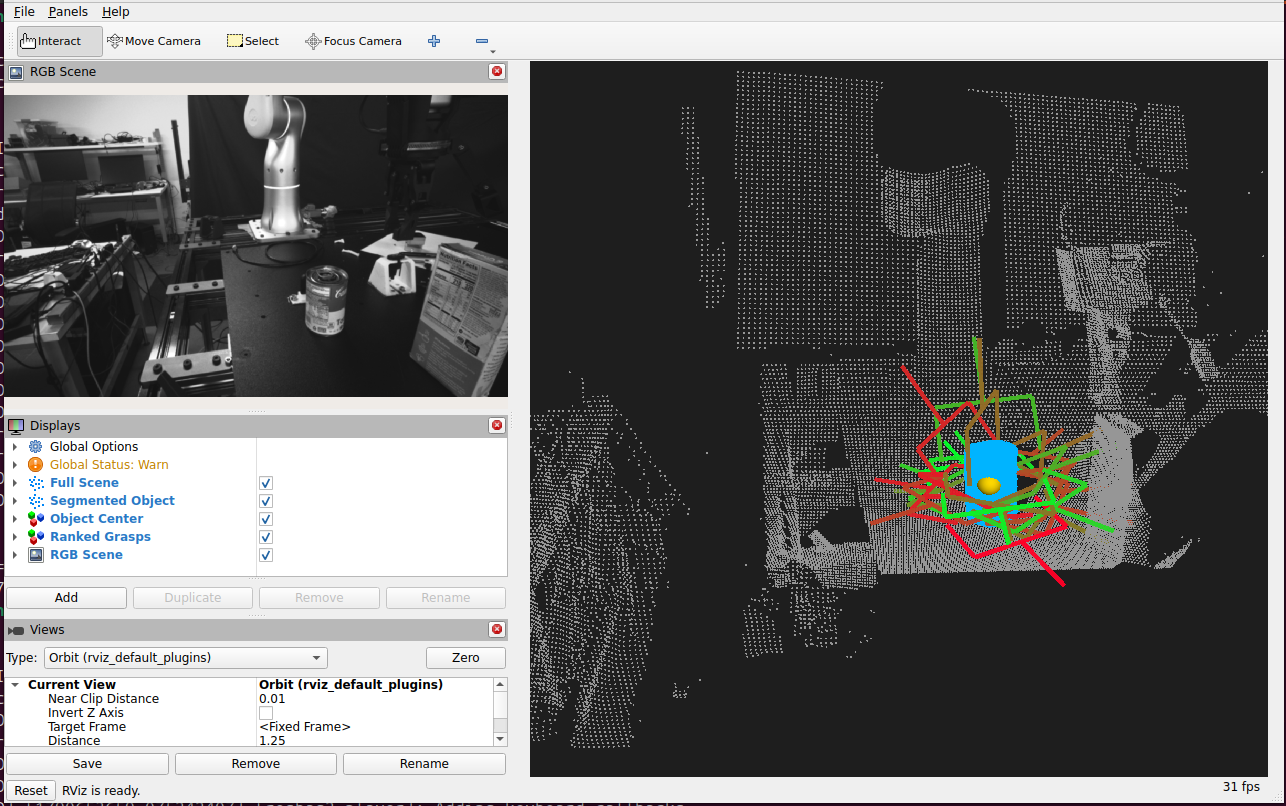
RViz shows the RGB image, the segmented object, and 20 (configured) grasps, colored from red (lowest confidence among the displayed grasps) to green (highest):
Run a Batch of Objects with the Included Sample Bag#
mask_topics:
  - /segmentation_can
  - /segmentation_box
Batch result i belongs to mask_topics[i]. The visualization client sends
one GenerateGraspsBatch goal for the first complete batch. For other objects,
copy the file, edit mask_topics, and pass
batch_config_file:=/path/to/your_batch.yaml.
Launch the quickstart in batch mode with the default batch config:
ros2 launch isaac_ros_graspgenx graspgenx_quickstart.launch.py \
   depth_topic:=/offline_foundationstereo/depth_image \
   camera_info_topic:=/offline_foundationstereo/model_camera_info \
   rgb_topic:=/offline_foundationstereo/model_rgb \
   batch_mode:=true \
   origin_frame:=camera_2_infra1_optical_frame \
   use_sim_time:=true
After the components and model have loaded, replay the bag in a second terminal:
ros2 bag play \
   "${ISAAC_ROS_WS}/isaac_ros_assets/isaac_ros_graspgenx/rosbags/foundationstereo_sam_can_box" \
   --clock --rate 0.5 --delay 3
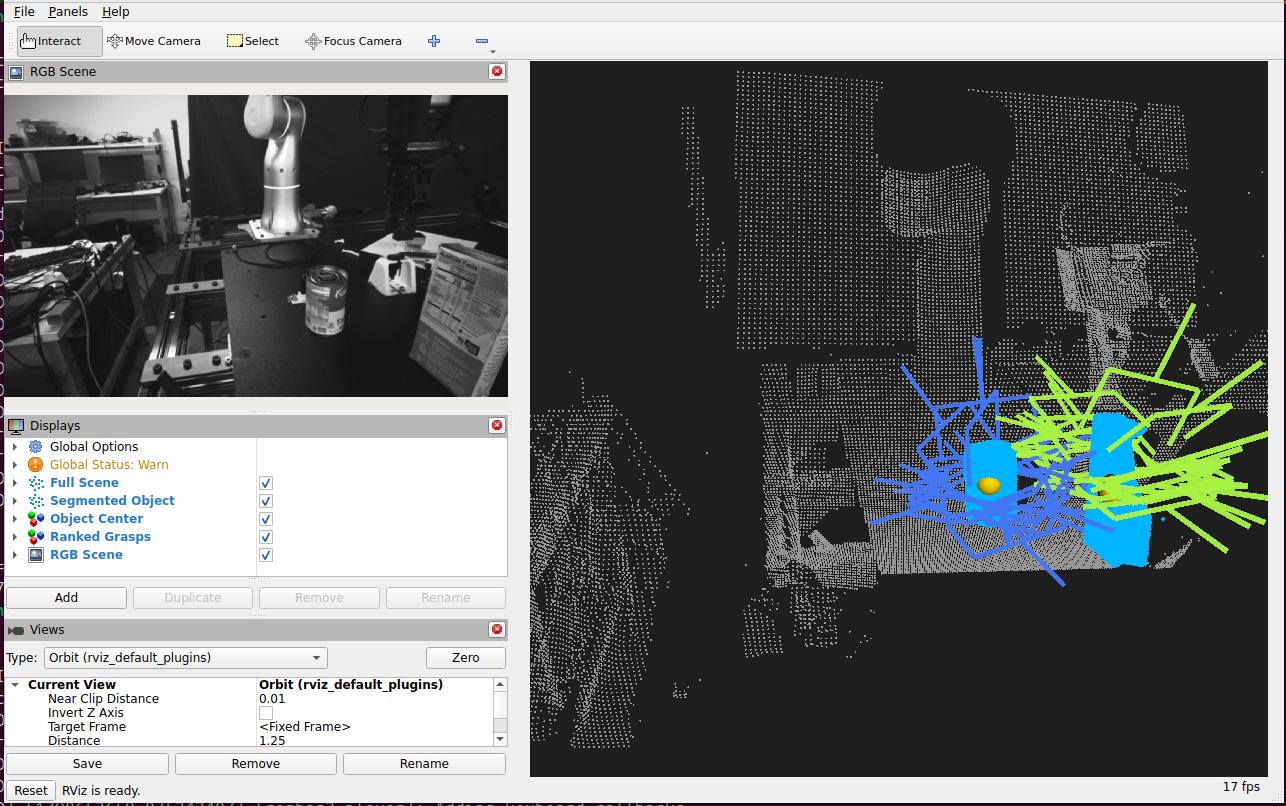
RViz shows both segmented objects and 20 (configured) grasps per object, colored by object:
Note
The grasps in this image also have confidence scores, but they are not color-coded, to keep the image simple.
Visualize Results#
RViz displays the input RGB image in the RGB Scene panel, the full scene in gray, the segmented objects in blue, and each object’s center in yellow. Single-object grasps are colored from red to green by increasing confidence, relative to the displayed grasps; batch grasps use one color per object. Select Move Camera in the toolbar to orbit, pan, and zoom the 3D view. To inspect the poses from a single-object request:
ros2 topic echo /graspgenx/grasp_candidates geometry_msgs/msg/PoseArray \
   --qos-durability transient_local --once
Returned poses do not establish reachability or collision-free motion.
Batch Inference with Custom Inputs#
To batch clouds from another source, publish a complete
SegmentedObjectCloudBatch on /graspgenx/segmented_object_cloud_batch
from a component in the action server’s container with intra-process
communication enabled, so the object clouds keep their CUDA buffers. Run the
example batch action client:
ros2 run isaac_ros_graspgenx graspgenx_batch_client
The client sends one GenerateGraspsBatch goal and logs the candidate count
for each batch position.
Troubleshooting#
No grasp result#
Verify that depth, camera-info, and mask topics use the configured names. Check their dimensions, timestamps, frame IDs, depth range, and mask overlap. Confirm that the action server received a nonempty point cloud with at least 100 points.
TensorRT initialization fails#
Verify that the engine and plugin paths exist and were built for the current GPU, CUDA, and TensorRT versions.
TF lookup fails#
Use the input optical frame as origin_frame or publish its transform at the
cloud timestamp. Use simulated time consistently during bag replay.
CPU-backed input is rejected#
Run the masked cloud builder and inference components with compatible CUDA
buffer transport on the same host and device. Serialized point-cloud playback
does not preserve device ownership. Object clouds inside a
SegmentedObjectCloudBatch keep their CUDA buffers only when the batch is
published in the action server’s container with intra-process communication.
Isaac ROS Troubleshooting#
For solutions to common Isaac ROS problems, refer to troubleshooting.
API#
GenerateGraspNode#
ROS Parameters#
ROS Parameter |
Type |
Default |
Description |
|---|---|---|---|
|
|
|
Frame used for returned grasp poses |
|
|
|
Gripper conditioning selected when an action goal leaves its name empty |
|
|
|
Deadline for TensorRT component discovery and inference output |
|
|
|
Minimum input point count |
|
|
|
Transform lookup timeout at the cloud timestamp |
|
|
|
Translation XYZ and quaternion XYZW applied to model grasp poses |
ROS Topics Subscribed#
ROS Topic |
Interface |
Description |
|---|---|---|
|
|
Latest single-object CUDA-backed cloud |
|
|
Latest complete batch of object clouds |
ROS Topics Published#
ROS Topic |
Interface |
Description |
|---|---|---|
|
|
Retained single-object candidate poses |
ROS Actions#
ROS Action |
Interface |
Description |
|---|---|---|
|
|
Generate grasps for the latest single-object cloud |
|
|
Generate object-scoped results for the latest complete batch |
GenerateBatchInputNode#
Publishes the batch input for GenerateGraspNode when the latest cloud on
every input topic has the same header stamp. Clouds are ordered by input topic.
Compose it in the action server’s container with intra-process communication
enabled.
ROS Parameters#
ROS Parameter |
Type |
Default |
Description |
|---|---|---|---|
|
|
|
Object cloud topics, one per object; must not be empty |
ROS Topics Subscribed#
ROS Topic |
Interface |
Description |
|---|---|---|
Each entry of |
|
CUDA-backed object cloud |
ROS Topics Published#
ROS Topic |
Interface |
Description |
|---|---|---|
|
|
Object clouds that share one header stamp |