

isaac_ros_foundationpose#
Source code available on GitHub.
Important
The peak GPU memory usage for the isaac_ros_foundationpose (FP32) pipeline in this tutorial is approximately 7 GB. Therefore, we recommend using a GPU with at least 8 GB of memory.
Quickstart#
Set Up Development Environment#
Set up your development environment by following the instructions in getting started.
(Optional) Install dependencies for any sensors you want to use by following the sensor-specific guides.
Note
We strongly recommend installing all sensor dependencies before starting any quickstarts. Some sensor dependencies require restarting the development environment during installation, which will interrupt the quickstart process.
Download Quickstart Assets#
Download quickstart data from NGC:
Make sure required libraries are installed.
sudo apt-get install -y curl jq tar
Then, run these commands to download the asset from NGC:
NGC_ORG="nvidia"
NGC_TEAM="isaac"
PACKAGE_NAME="isaac_ros_foundationpose"
NGC_RESOURCE="isaac_ros_foundationpose_assets"
NGC_FILENAME="quickstart.tar.gz"
MAJOR_VERSION=4
MINOR_VERSION=5
VERSION_REQ_URL="https://api.ngc.nvidia.com/v2/resources/$NGC_ORG/$NGC_TEAM/$NGC_RESOURCE/versions"
AVAILABLE_VERSIONS=$(curl -s \
    -H "Accept: application/json" "$VERSION_REQ_URL")
LATEST_VERSION_ID=$(echo $AVAILABLE_VERSIONS | jq -r "
    .recipeVersions[]
    | .versionId as \$v
    | \$v | select(test(\"^\\\\d+\\\\.\\\\d+\\\\.\\\\d+$\"))
    | split(\".\") | {major: .[0]|tonumber, minor: .[1]|tonumber, patch: .[2]|tonumber}
    | select(.major == $MAJOR_VERSION and .minor <= $MINOR_VERSION)
    | \$v
    " | sort -V | tail -n 1
)
if [ -z "$LATEST_VERSION_ID" ]; then
    echo "No corresponding version found for Isaac ROS $MAJOR_VERSION.$MINOR_VERSION"
    echo "Found versions:"
    echo $AVAILABLE_VERSIONS | jq -r '.recipeVersions[].versionId'
else
    mkdir -p ${ISAAC_ROS_WS}/isaac_ros_assets && \
    FILE_REQ_URL="https://api.ngc.nvidia.com/v2/resources/$NGC_ORG/$NGC_TEAM/$NGC_RESOURCE/\
versions/$LATEST_VERSION_ID/files/$NGC_FILENAME" && \
    curl -LO --request GET "${FILE_REQ_URL}" && \
    tar -xf ${NGC_FILENAME} -C ${ISAAC_ROS_WS}/isaac_ros_assets && \
    rm ${NGC_FILENAME}
fi
Download the pre-trained FoundationPose models from NGC to the required directory:
mkdir -p ${ISAAC_ROS_WS}/isaac_ros_assets/models/foundationpose && \
   cd ${ISAAC_ROS_WS}/isaac_ros_assets/models/foundationpose && \
   wget 'https://api.ngc.nvidia.com/v2/models/nvidia/isaac/foundationpose/versions/1.0.1_onnx/files/refine_model.onnx' -O refine_model.onnx && \
   wget 'https://api.ngc.nvidia.com/v2/models/nvidia/isaac/foundationpose/versions/1.0.1_onnx/files/score_model.onnx' -O score_model.onnx
Build isaac_ros_foundationpose#
Activate the Isaac ROS environment:
isaac-ros activateInstall the prebuilt Debian package:
sudo apt-get update
sudo apt-get install -y ros-jazzy-isaac-ros-foundationpose
Install Git LFS:
sudo apt-get install -y git-lfs && git lfs install
Clone this repository under
${ISAAC_ROS_WS}/src:cd ${ISAAC_ROS_WS}/src && \ git clone -b release-4.5 https://github.com/NVIDIA-ISAAC-ROS/isaac_ros_pose_estimation.git isaac_ros_pose_estimation
Activate the Isaac ROS environment:
isaac-ros activateUse
rosdepto install the package’s dependencies:sudo apt-get update
rosdep update && rosdep install --from-paths ${ISAAC_ROS_WS}/src/isaac_ros_pose_estimation/isaac_ros_foundationpose --ignore-src -y
Build the package from source:
cd ${ISAAC_ROS_WS}/ && \
   colcon build --symlink-install --packages-up-to isaac_ros_foundationpose --base-paths ${ISAAC_ROS_WS}/src/isaac_ros_pose_estimation/isaac_ros_foundationpose
Source the ROS workspace:
Note
Make sure to repeat this step in every terminal created inside the Isaac ROS environment.
Because this package was built from source, the enclosing workspace must be sourced for ROS to be able to find the package’s contents.
source install/setup.bash
Run Launch File#
Inside the container, convert models from
.onnxto TensorRT engine plans:Convert the refine model:
/usr/src/tensorrt/bin/trtexec --onnx=${ISAAC_ROS_WS}/isaac_ros_assets/models/foundationpose/refine_model.onnx --saveEngine=${ISAAC_ROS_WS}/isaac_ros_assets/models/foundationpose/refine_trt_engine.plan --minShapes=input1:1x160x160x6,input2:1x160x160x6 --optShapes=input1:1x160x160x6,input2:1x160x160x6 --maxShapes=input1:42x160x160x6,input2:42x160x160x6
Convert the score model:
/usr/src/tensorrt/bin/trtexec --onnx=${ISAAC_ROS_WS}/isaac_ros_assets/models/foundationpose/score_model.onnx --saveEngine=${ISAAC_ROS_WS}/isaac_ros_assets/models/foundationpose/score_trt_engine.plan --minShapes=input1:1x160x160x6,input2:1x160x160x6 --optShapes=input1:1x160x160x6,input2:1x160x160x6 --maxShapes=input1:252x160x160x6,input2:252x160x160x6
Note
FoundationPose TensorRT engines are running with FP32 precision in TensorRT 10.3+ versions due to FP16 precision loss.
Note
The model conversion time varies across different platforms. On Jetson AGX Thor, the engine conversion process takes ~10-15 minutes to complete.
Complete the Isaac ROS RT-DETR tutorial.
Continuing inside the container, install the following dependencies:
sudo apt-get update
sudo apt-get install -y ros-jazzy-isaac-ros-examples
Run the following launch files to spin up a demo of this package:
Launch
isaac_ros_foundationpose:ros2 launch isaac_ros_examples isaac_ros_examples.launch.py launch_fragments:=foundationpose interface_specs_file:=${ISAAC_ROS_WS}/isaac_ros_assets/isaac_ros_foundationpose/quickstart_interface_specs.json mesh_file_path:=${ISAAC_ROS_WS}/isaac_ros_assets/isaac_ros_foundationpose/Mustard/textured_simple.obj score_engine_file_path:=${ISAAC_ROS_WS}/isaac_ros_assets/models/foundationpose/score_trt_engine.plan refine_engine_file_path:=${ISAAC_ROS_WS}/isaac_ros_assets/models/foundationpose/refine_trt_engine.plan rt_detr_engine_file_path:=${ISAAC_ROS_WS}/isaac_ros_assets/models/synthetica_detr/sdetr_grasp.plan
Open a second terminal and activate the Isaac ROS environment:
isaac-ros activatePlay the rosbag:
ros2 bag play -l ${ISAAC_ROS_WS}/isaac_ros_assets/isaac_ros_foundationpose/quickstart.bag/
Ensure that you have already set up your RealSense camera using the RealSense setup tutorial. If you have not, set up the sensor and then restart this quickstart from the beginning.
Complete the Isaac ROS RT-DETR tutorial.
Open a new terminal and activate the Isaac ROS environment:
isaac-ros activateInstall the following dependencies:
sudo apt-get update
sudo apt-get install -y ros-jazzy-isaac-ros-examples ros-jazzy-isaac-ros-realsense
Place the object in front of the camera and run the launch file:
ros2 launch isaac_ros_examples isaac_ros_examples.launch.py launch_fragments:=realsense_mono_rect_depth,foundationpose mesh_file_path:=${ISAAC_ROS_WS}/isaac_ros_assets/isaac_ros_foundationpose/Mac_and_cheese_0_1/Mac_and_cheese_0_1.obj score_engine_file_path:=${ISAAC_ROS_WS}/isaac_ros_assets/models/foundationpose/score_trt_engine.plan refine_engine_file_path:=${ISAAC_ROS_WS}/isaac_ros_assets/models/foundationpose/refine_trt_engine.plan rt_detr_engine_file_path:=${ISAAC_ROS_WS}/isaac_ros_assets/models/synthetica_detr/sdetr_grasp.plan
Visualize Results#
Open a new terminal and activate the Isaac ROS environment:
isaac-ros activateInstall RViz and the
vision_msgsRViz plugin:sudo apt-get install -y ros-jazzy-rviz2 ros-jazzy-vision-msgs-rviz-plugins source /opt/ros/jazzy/setup.bash
launch
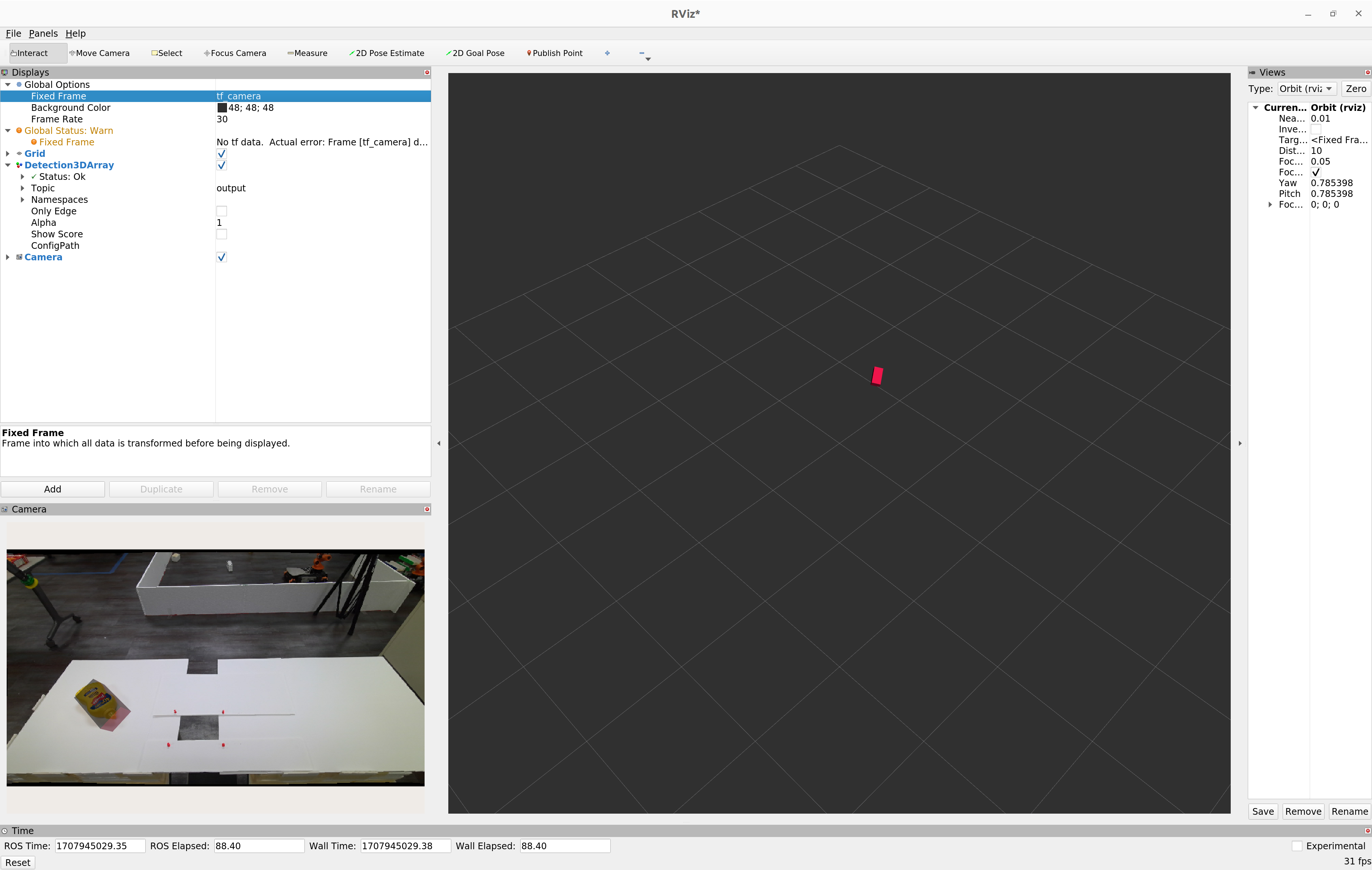
RViz2to visualize the outputrviz2 -d $(ros2 pkg prefix isaac_ros_foundationpose --share)/rviz/foundationpose.rviz
You should see a
RViz2window open as shown below showing the 3D bounding box overlaid over the input image
launch
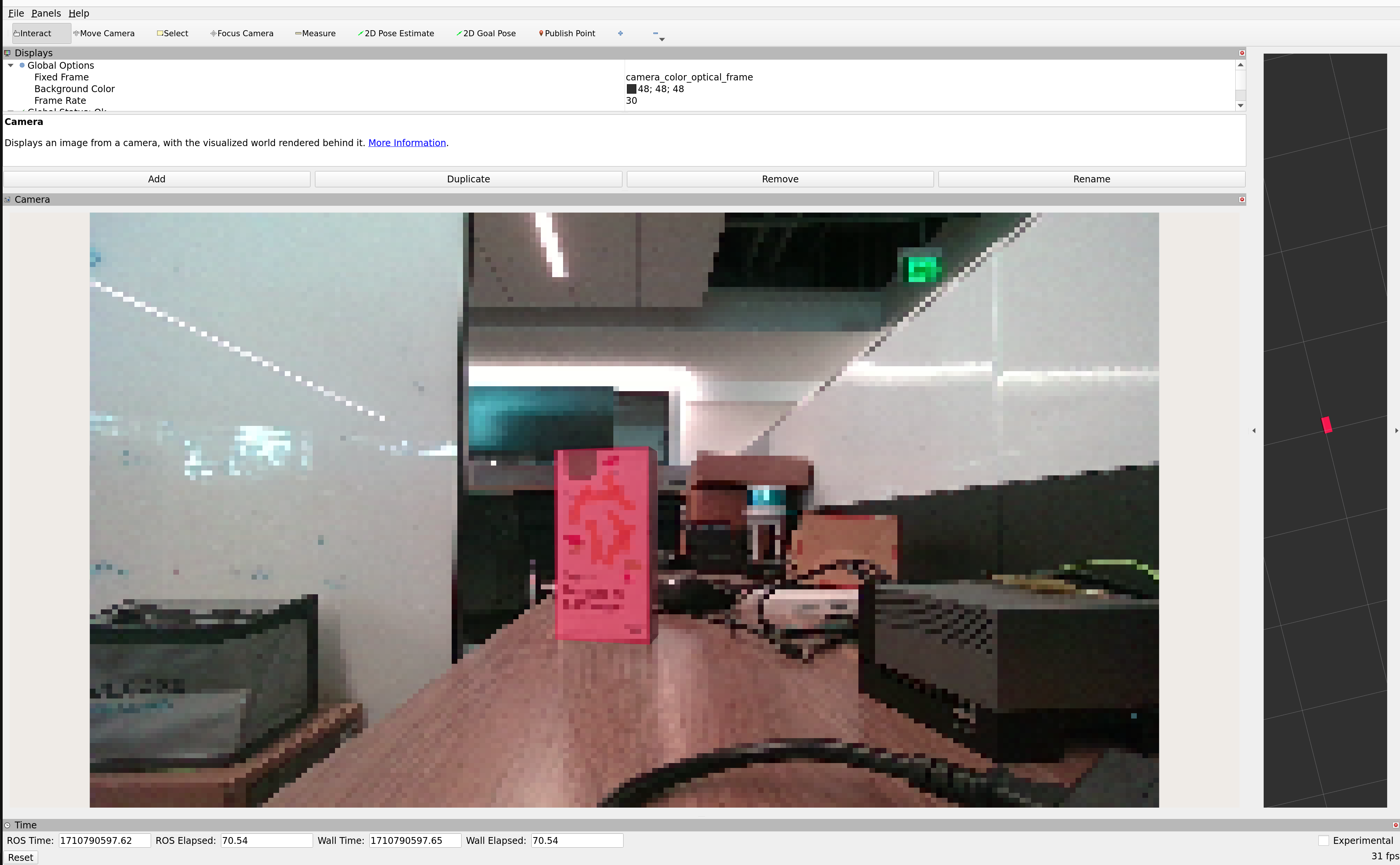
RViz2to visualize the outputrviz2 -d $(ros2 pkg prefix isaac_ros_foundationpose --share)/rviz/foundationpose_realsense.rviz
You should see a visualization of the 3D pose estimate as shown below:
Note
FoundationPose is designed to perform pose estimation on previously unseen objects without model retraining. As a result, inference requires significant GPU compute for first detection. Tracking once an initial pose estimation is determined can be significantly faster, however. Refer to performance of the model for your target platform to determine which model to use.
More powerful discrete GPUs can outperform all other platforms for this task and should be preferred if higher performance is required. Interleaving pose estimation with other tasks rather than running continuously can be a more effective solution as well. Finally, if runtime performance is critical and offline training resources are available, developers can train CenterPose for their own target objects using synthetic data generation and/or real-world data for faster pose estimation.
Try More Examples#
To continue your exploration, check out the following suggested examples:
Isaac ROS Troubleshooting#
For solutions to problems with Isaac ROS, review here.
Deep Learning Troubleshooting#
For solutions to problems with using DNN models, review here.
API#
Usage#
ros2 launch isaac_ros_foundationpose isaac_ros_foundationpose.launch.py refine_engine_file_path:=<path to refine model .plan> score_engine_file_path:=<path to score model .plan> mesh_file_path:=<path to object mesh file> launch_rviz:=<enable rviz> launch_bbox_to_mask:=<enable bbox to mask converter> mask_height:=<converted mask height> mask_width:=<converted mask width>
FoundationPose Node#
ROS Parameters#
ROS Parameter |
Type |
Default |
Description |
|---|---|---|---|
|
|
|
The absolute path to the target object mesh file. |
|
|
|
Minimum allowed Z-axis value of pointcloud. |
|
|
|
Minimum allowed X,Y,Z-axis value of pointcloud to threshold. |
|
|
|
The number of iterations applied to the refinement model can enhance accuracy. However, more iterations will take longer time for processing. |
|
|
|
Rotational symmetries around axes with angles in format ‘axis_angle’ (for example, ‘x_30’ for 30 degrees around x-axis). Valid axes are [x, y, z]. Angles must be explicitly specified (for example, ‘x_180’) or use ‘full’ for full rotation (evaluated at 30° increments). |
|
|
|
Deprecated: Use symmetry_axes instead. Adds 180-degree rotational symmetry around specified axes. Format: ‘axis’ (for example, ‘x’ for 180-degree rotation around x-axis). Valid axes are [x, y, z]. |
|
|
|
Fixed poses constrain the orientation angles during pose estimation by specifying axis-angle pairs (for example, x_30, y_45) that force rotations around specific axes to remain at the given values in degrees. |
|
|
|
Fixed translation components in format ‘axis_value’ (for example, ‘x_0.1’, ‘y_0.2’, ‘z_0.3’). Valid axes are [x, y, z] for translation in x, y, z directions respectively. If provided, these will override the initial estimated translations. |
|
|
|
Tensor names used by the rendered/observed refine inputs published to the separate TensorRT node. |
|
|
|
Tensor names used by the rendered/observed score inputs published to the separate TensorRT node. |
|
|
|
Name of the frame that is used when publishing the pose to the TF tree. |
|
|
|
Timeout used by the pose-estimation processing watchdog, in milliseconds. |
|
|
|
Input QoS profile for the RGB, depth, camera info, and segmentation inputs. |
|
|
|
Input QoS queue depth for the RGB, depth, camera info, and segmentation inputs. |
|
|
|
Output QoS profile for detection and pose-matrix outputs. |
|
|
|
Output QoS queue depth for detection and pose-matrix outputs. |
ROS Topics Subscribed#
ROS Topic |
Interface |
Description |
|---|---|---|
|
The input depth image. |
|
|
The input segmentation mask. |
|
|
The input color image (rectified). |
|
|
The input image camera_info. |
ROS Topics Published#
ROS Topic |
Interface |
Description |
|---|---|---|
|
The output pose estimate. |
|
|
The output pose matrix, used as the input for next frame tracking. |
FoundationPose Tracking Node#
ROS Parameters#
ROS Parameter |
Type |
Default |
Description |
|---|---|---|---|
|
|
|
The absolute path to the target object mesh file. |
|
|
|
Minimum allowed Z-axis value of pointcloud. |
|
|
|
Minimum allowed X,Y,Z-axis value of pointcloud to threshold. |
|
|
|
Tensor names used by the rendered/observed refine inputs published to the separate TensorRT node. |
|
|
|
Name of the frame that is used when publishing the pose to the TF tree. |
|
|
|
When enabled, the tracker checks each refined pose against the input point cloud and asks the Selector to reset to pose estimation if the object appears to have drifted off the visible point cloud (see |
|
|
|
Minimum number of input point cloud points that must lie within |
|
|
|
Input QoS profile for the RGB, depth, and camera info inputs. |
|
|
|
Input QoS queue depth for the RGB, depth, and camera info inputs. |
|
|
|
Output QoS profile for detection and pose-matrix outputs. |
|
|
|
Output QoS queue depth for detection and pose-matrix outputs. |
ROS Topics Subscribed#
ROS Topic |
Interface |
Description |
|---|---|---|
|
The input depth image. |
|
|
The input pose estimation matrix from last frame. |
|
|
The input color image (rectified). |
|
|
The input image camera_info. |
ROS Topics Published#
ROS Topic |
Interface |
Description |
|---|---|---|
|
The output pose estimate. |
|
|
The output pose matrix, used as the input for next frame tracking. |
FoundationPose Selector Node#
ROS Parameters#
ROS Parameter |
Type |
Default |
Description |
|---|---|---|---|
|
|
|
The reset period in milliseconds. |
ROS Topics Subscribed#
ROS Topic |
Interface |
Description |
|---|---|---|
|
The input depth image. |
|
|
The input segmentation mask. |
|
|
The input color image (rectified). |
|
|
The input image camera_info. |
|
|
The input pose matrix comes from last frame tracking. |
|
|
The input pose matrix comes from pose estimation. |
ROS Topics Published#
ROS Topic |
Interface |
Description |
|---|---|---|
|
The output depth image for pose estimation. |
|
|
The output segmentation mask for pose estimation. |
|
|
The output color image (rectified) for pose estimation. |
|
|
The output image camera_info for pose estimation. |
|
|
The output segmentation mask for tracking. |
|
|
The output color image (rectified) for tracking. |
|
|
The output image camera_info for tracking. |
|
|
The output pose matrix, used as the input for next frame tracking. |
FoundationPose Detection2DToMask Node#
ROS Parameters#
ROS Parameter |
Type |
Default |
Description |
|---|---|---|---|
|
|
|
The output mask width. FoundationPose expects the mask to have the same dimensions as the RGB image. |
|
|
|
The output mask height. FoundationPose expects the mask to have the same dimensions as the RGB image. |
ROS Topics Subscribed#
ROS Topic |
Interface |
Description |
|---|---|---|
|
The input Detection2D message. |
|
|
The input Detection2D Array message. The mask is created using the highest-scoring detection from the input Detection2D Array message. |
ROS Topics Published#
ROS Topic |
Interface |
Description |
|---|---|---|
|
The output binary segmentation mask. |